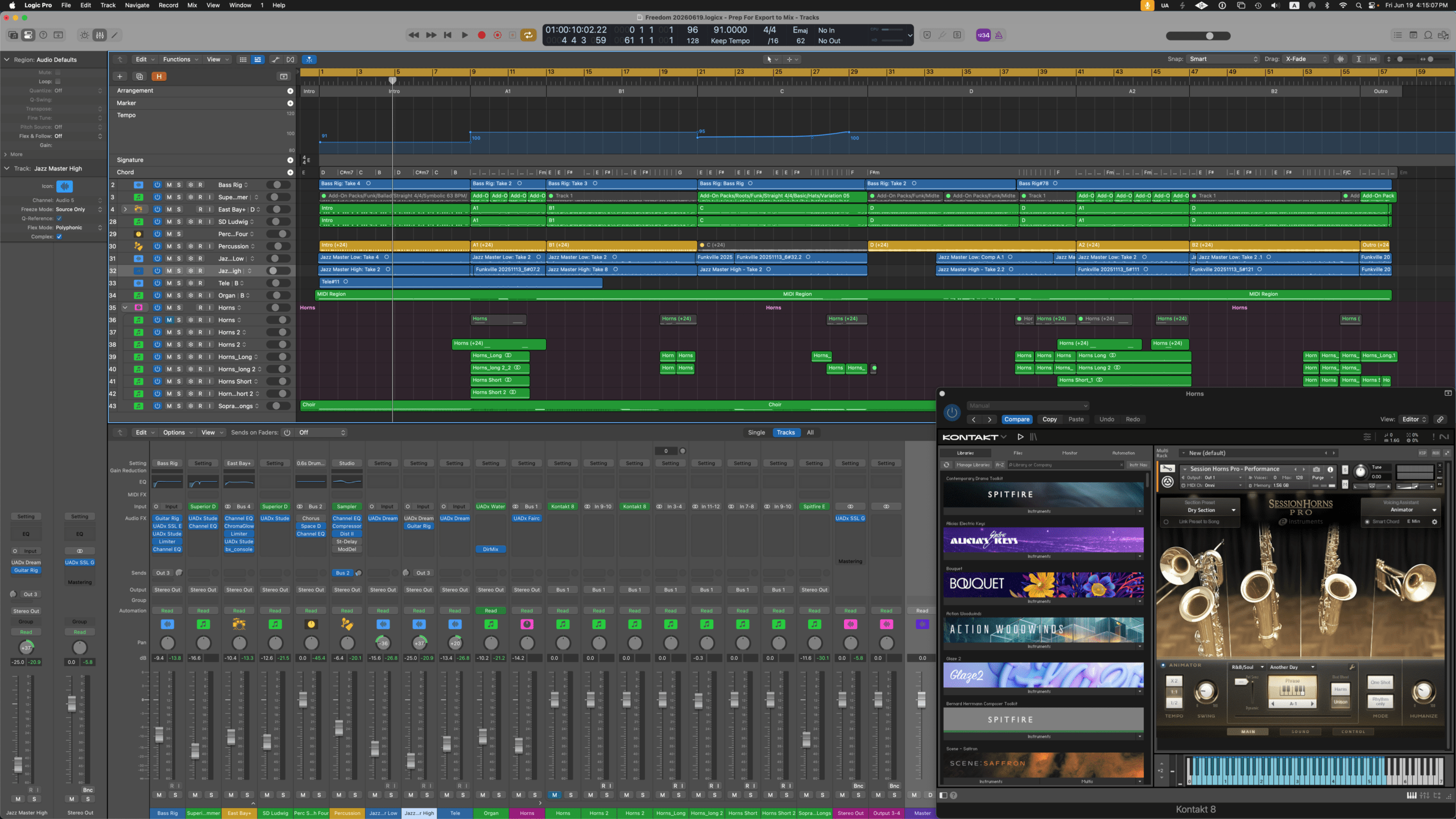
I love the chord voicings and progressions in Gospel music and have been wanting to do a gospel-inspired song for a few years. Aretha Franklin’s “Amazing Grace” is one of the most powerful, uplifting, and spiritually rich pieces of music I have ever experienced. I watched videos on gospel piano and Hammond B3 to get a feeling of what would be involved and set out to write a song about feeling lost and then finding clarity and alignment. As the piece started coming together, something just didn’t feel right. I was getting “all the feels” as I hit the chorus, but also felt deeply wrong at the same time.
I am a big believer in spirituality and finding spiritual connections in the world, but I am not a fan of organized religion – historically, it has done so much more harm than good. So the song’s lyrics had to take a turn to feel honest to me. What started as a song about finding community through faith became a critique of religious rules and worthiness.
The final version is honest, even if it’s not what I originally planned. It’s full of gospel voicings, inversions, and the “Sunday scale” – but the message is mine.
In the arc of the Identity album, “The Gospel” adds more complex instrumentation and color, while extending the sentiment of “Angel” as the protagonist continues their search for connection and understanding, reaching for “something more”.
Special Recording Notes
All instruments were recorded in Logic at 24‑bit/96kHz.
Lead vocal: No external processing during recording – captured dry to leave flexibility for later.
Backing vocals: Mervyn Warren Choir, programmed via MIDI.
Bass: Electric bass played live.
Guitars: Two electric guitar parts played live.
Drums: Superior Drummer Reel Reel – Woodroom Drums. A new library to me – and I love it!
Organ: Logic Pro’s “Oakland Organ” and UA’s Waterfall Organ.
Piano: Native Instruments Kontakt “The Maverick” (using the “Deep Maverick” preset).
All tracks were exported into Luna for mixing.
Special Mix Prep Notes (Post‑Tracking, Pre‑Mixing)
Clip gain: Adjusted every vocal region to around -18 dB RMS before any processing.
Melodyne: Used for both pitch correction and the sibilant tool – far superior to FlexPitch.
Hardware Voxbox: Ran the lead vocal through my Manley Voxbox as a hardware insert. Settings:
Input: 12:00, Gain: 48, HPF: 80Hz
Compressor: Threshold 2:00, Attack Medium Slow, Release Medium Fast
Submasters: Created group submasters for Drums, Bass, Guitars, Piano, Organ, BVs/Choir, and Lead Vocal.
API EQ trick: Used on the electric guitars – +1 click of 3k on one guitar, +1 click of 5k on the other (UAD API 550).
Drums: Empirical Labs Distressor (modified “Parallel Drum Bus” preset) for parallel compression on the Reel to Reel Drums.
Bass: dbx 160 and Pultec EQP‑1A.
Lead Vocal: UA SSL 4000E on the channel. Empirical Labs Distressor (“Stronger Vocal Compressor” preset) for parallel compression. Shadow Hills (modified “Vox Male” preset) on the lead vocal submaster.
Vocal double: Created via Melodyne, processed with A‑Type (“Feeling That Way” preset).
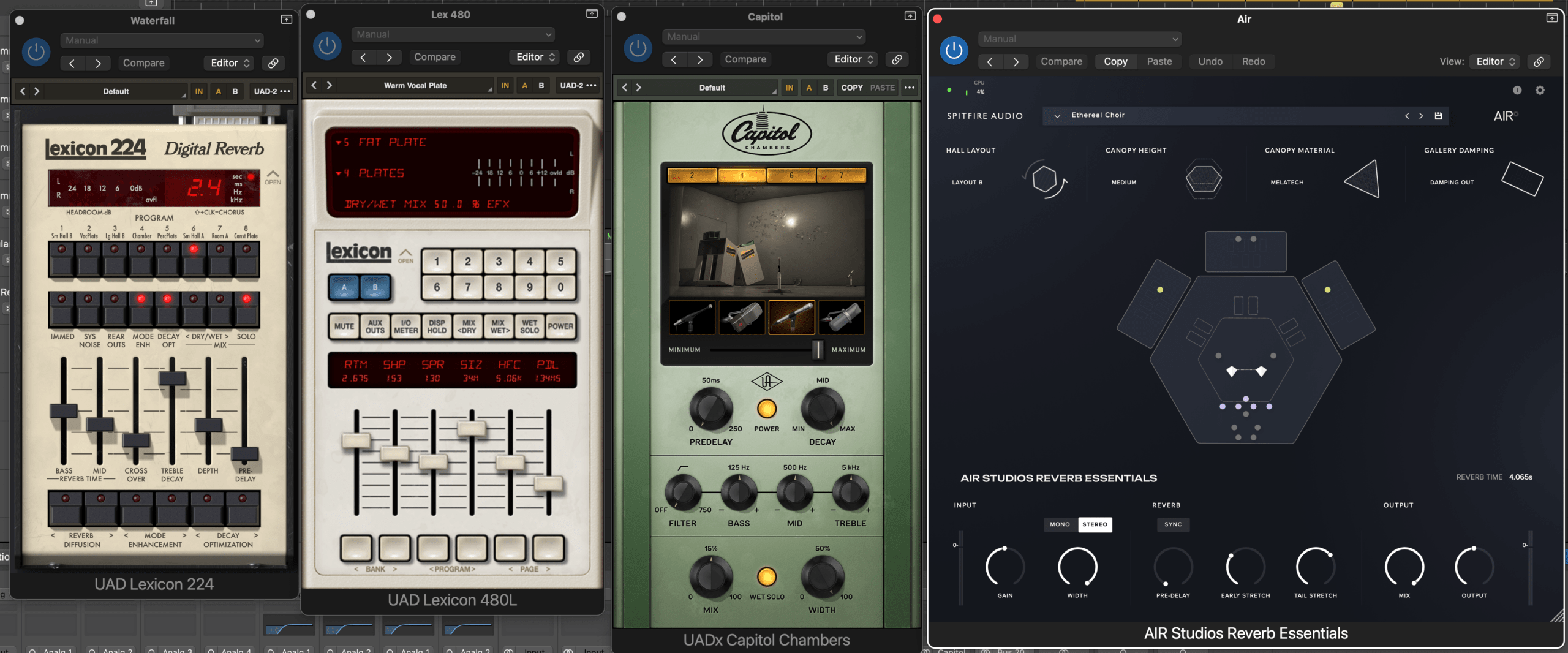
Reverb: Capitol Chambers (modified “Big Vocal Sauce” preset) on a send for lead vocal.
Black Box on each group submaster:
Drums: “Mix Bus 4 Aggro Rock”
Bass: “08 Black Wow”
Guitars: “15 Guitar Opener”
Piano: “18 Mix Bus 2”
Organ: “35 Master‑Rock Anarchy”
BVs/Choir: “07 Airy Vocal”
Lead Vocal: “05 Acoustic Sparkle”
Mix Bus processing: Black Box, SSL G Bus Compressor, Fairchild 670, ATR-102, plus a Pultec EQP‑1A boosting & attenuating 2dB @ 100Hz & 10kHz.
Special Mastering Notes
Target LUFS: Aimed for approximately -14 LUFS at the climax.
Ozone settings:
Vintage Tape: “Clear Character” preset
Equalizer: Slight boost of +0.6 dB @ 10.696 kHz (Shelf)
“Us” started with a tuning I had never used before: Open D (DADF#AD). I’ve written songs in alternate tunings previously, but never in Open D. The moment I strummed that first chord on my Taylor “Zeus”, I knew there was a song in there waiting for me to discover. It felt deeply resonant, wide, and somehow nostalgic. The song came together over a few days of songwriting rotations.
The song’s melody and movements reminded me of my family, all the fun and magical moments we have shared over the years. It feels warm and expansive with a sense of adventure to me.
For the album’s narrative, this song builds on the nostalgia of “Angel” – remembering what was good in one’s life and wanting that to last as long as possible.
I rehearsed the song daily and performed it at multiple CST sessions. By the time I was ready to record, I knew the song inside out – but that didn’t make the recording process any easier (see Special Recording Notes).
Special Recording Notes
Guitar: Taylor “Zeus”, tuned to Open D (DADF#AD).
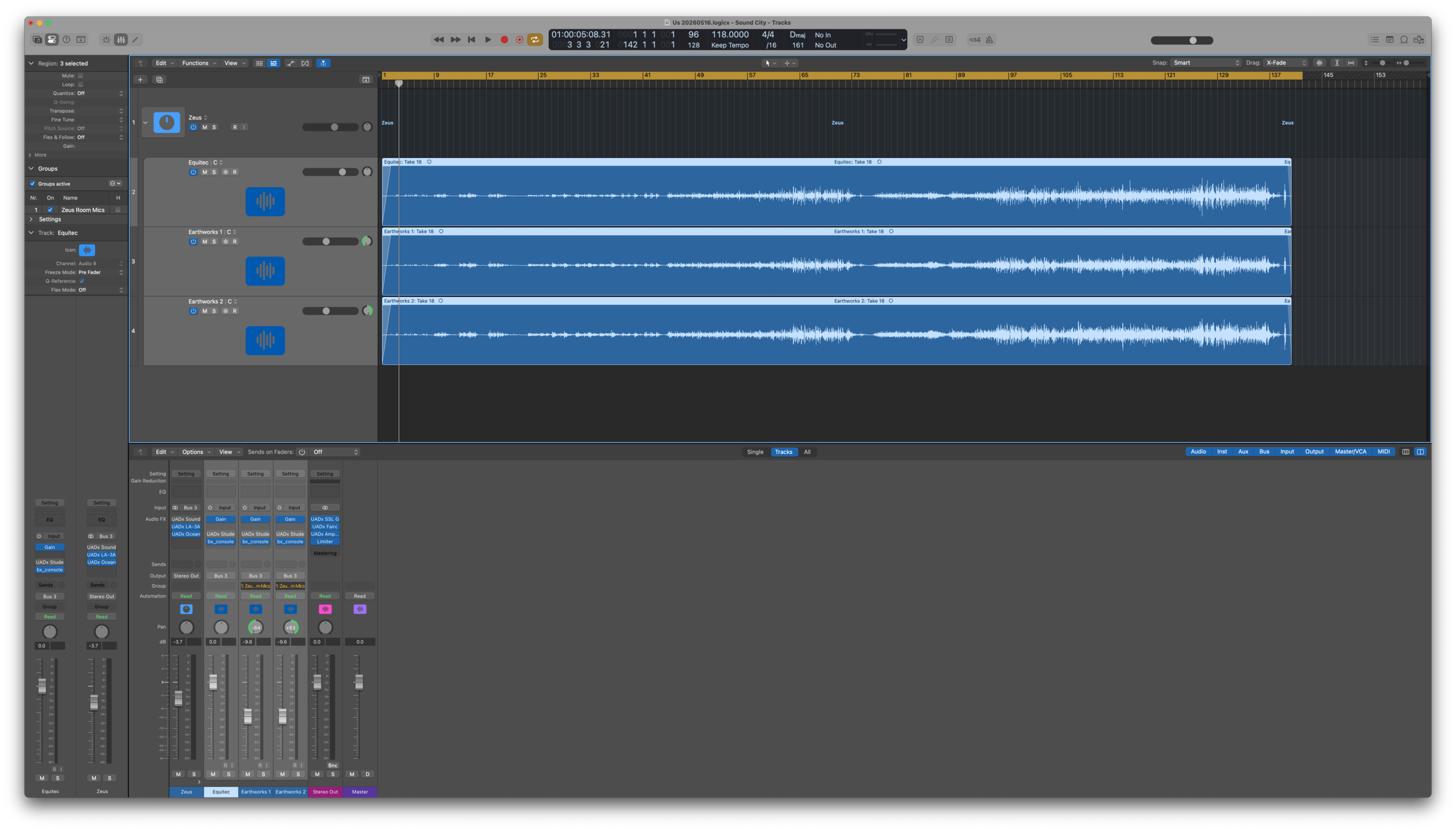
Microphone setup: Multi‑mic technique – one Equitec mic at the 12th fret, plus two Earthworks microphones in stereo a few feet away and slightly above. This gave me flexibility in mixing to balance string articulation and room tones. I was pleasantly surprised by the depth this approach afforded me.
Recording environment: Outside noise (delivery trucks, helicopters, planes) ruined many takes. I learned to record during quiet late‑night hours.
Keeper take: Take 18 was the one. It felt solid from start to finish. I marked it immediately.
Special Mix Prep Notes (Post‑Tracking, Pre‑Mixing)
After some clip gain adjustments (shooting for -18dB RMS), I exported all the files out of Logic and brought them into Luna for mixing.
Special Mixing Notes
Submasters: Created a group sub‑master for the guitar tracks.
Brainworx SSL 9000 J: Used on each of the guitar channels for tone shaping.
Fairchild 670: Used on a send with modified settings (adjusted Input and Threshold from the default) for parallel compression.
LA‑3A: On the group sub‑master using the “Acoustic Guitar” preset. (Got this idea from a Bob Clearmountain video.)
Ocean Way Studios: Used in reverb mode on a send.
Capitol Chambers: Used with a modified version of the “Acoustic Guitar Chamber 6” preset.
Mix Bus processing: Black Box (“17 Mix Bus 1” preset), SSL G Bus Compressor (modified Default setting), Fairchild 670 (Modified Stereo Bus preset), ATR-102 (modified Default setting)
Special Mastering Notes
Target LUFS: Aimed for approximately -16 LUFS (preserving the wide dynamic range – very soft to triple forte).
Ozone settings:
Vintage Tape: “Clean Fifteen” preset
Equalizer: -1.2 dB @ 239 Hz (Bell, Q 8.9), +0.6 dB @ 10.7 kHz (Shelf, Q 24.0)
For the Identity album, I wanted to start small and end huge, with complexity and volume building over time. To do this, I felt the first song had to be elemental and essential. What better way to convey this than with the most fundamental musical instrument: the human voice? That song would become “Angel”.
When I first started sketching the piece out, I sat at my keyboard with a notebook and a pencil. No complicated samples, just my voice and a simple piano sound. I needed to figure out the chords, the melody, and how the verses would shift from minor to major. That piano sketch became the blueprint for everything that followed.
I originally intended to sing all the vocal parts myself – four voices, stacked and blended. I created a lead sheet and rehearsed the main vocal with piano daily. But as my self‑imposed recording deadline approached, I realized that I was running out of time. I had never actually tried singing the other parts, and I wasn’t confident that I could get the blend and consistency I wanted in the time I had left. I needed a better solution.
Then I discovered Mervyn Warren’s Choir library (Spitfire Audio) during a Black Friday sale. That changed everything. Suddenly, I had a real‑sounding ensemble that could support my lead vocal without overpowering it. I ended up using the choir throughout the entire piece, from start to finish – introducing different sections of the choir at key points (bridge, final chorus) but always keeping a choral presence underneath.
Once I had a rough mix together, hearing everything blend together, I knew this was going to work as the opener to the album that I had originally imagined. Mixing and mastering this piece was pretty straightforward as there weren’t too many tracks and everything was sounding really good with some minimal processing.
Special Recording Notes
Lead vocal: Recorded in Logic at 24bit/96kHz.
No external processing during recording – captured dry to leave flexibility for later.
Special Mix Prep Notes (Post‑Tracking, Pre‑Mixing)
Clip gain: Adjusted every vocal region to around -18 dB RMS before any processing.
Melodyne: Used for both pitch correction and the sibilant tool – far superior to FlexPitch.
Hardware Voxbox: Ran the lead vocal through my Manley Voxbox as a hardware insert. Settings:
Input: 1:00, Gain: 48, HPF: 80Hz
Compressor: Threshold 12:00, Attack Fast, Release Medium Fast (“Classic LA2A”)
Choir: Mervyn Warren Choir, programmed via MIDI and rendered as audio, placed on its own fader groups. Created submasters for each choir section (e.g., soprano, alto, tenor, bass) and wrote automation to build dynamics across the song’s sections (intro, verse, chorus, bridge, outro).
Lead vocal chain: After the hardware insert, I set up two sends: one for parallel compression using a Fairchild 660, and another to a dedicated instance of Black Box using the “Airy Vocal” preset for some “dirt”. I blended both in with the main vocal track.
Reverb:
Lexicon 480L with the “Dialog 2” setting on one send.
Air Studios Reverb Essentials with the “Cathedral Strings” setting on another send, used during the climax.
Blackbox: Added to master bus with the “16 Mix Bus 1” preset – gave the whole track a subtle, warm glue.
Special Mastering Notes
Target LUFS: Aimed for -15 to -16 LUFS (intimate, natural, breath).
Ozone settings:
EQ: Made small adjustments – +0.8 dB on high shelf @ 10.5 kHz
Identity is now streaming everywhere and on Bandcamp. This is how it was made.
While doing an annual year‑end review of 2024 and planning for 2025, I started jotting down ideas on my whiteboard for a new music project – things that might be fun and interesting to try.
My initial brain dump
Some ideas were based on tools I wanted to use and/or get more familiar with (Spitfire Audio’s Fragile String Evolutions, Abbey Road Strings, Abbey Road Percussion, Universal Audio’s Luna and mixing plugins, Tone Master, Superior Drummer, Omnisphere, and Dorico). Others were genres I wanted to explore (Texas guitar, Motown‑ish funk bass, gospel chords & changes, a Nine Inch Nails‑style synth piece, an acoustic piece, a Radiohead‑meets‑Soundgarden song, a guitar texture looping piece, and a long textural orchestral composition).
I started by creating an abstraction of how I imagined the album starting and finishing, with some artist references to draw from.
Initial ideas for the album contour abstraction
I then fleshed out the abstraction to get an even clearer picture of what happened in between.
Filled out the abstraction by defining each piece from start to finish.
The working title was Harvest. I gave myself three months (June 1 to August 31, 2025) to finish it. (Spoiler: that didn’t happen.) For the most part, I stayed true to these abstractions and musical sketches I put together in that first week.
The album became Identity – nine tracks that start small and elemental (a cappella) and end huge, bombastic, ornate, and broad, with everything in between. To prepare, I listened to and studied artists I’ve long admired: Todd Rundgren’s “Pretending to Care” (for the a cappella piece); Aretha Franklin’s “Amazing Grace” (gospel); Ry Cooder, Jedd Hughes, and Lyle Lovett (that lonesome Texas guitar feeling); Joe Dart’s playing on Vulfpeck’s “Dean Town” and James Jamerson for Motown funk; Robert Fripp’s Frippertronics (guitar looping); Nine Inch Nails’ Tension 2013 tour (Pino Palladino on “Sanctified”) and their collaboration with David Bowie (“I’m Afraid of Americans”) for a hard‑hitting synth piece; Ligeti and Penderecki (aleatoric and textural ideas); and Peter Gabriel’s New Blood Orchestra versions of “Signal to Noise” and “Rhythm of the Heat” (which informed my approach to the orchestral piece).
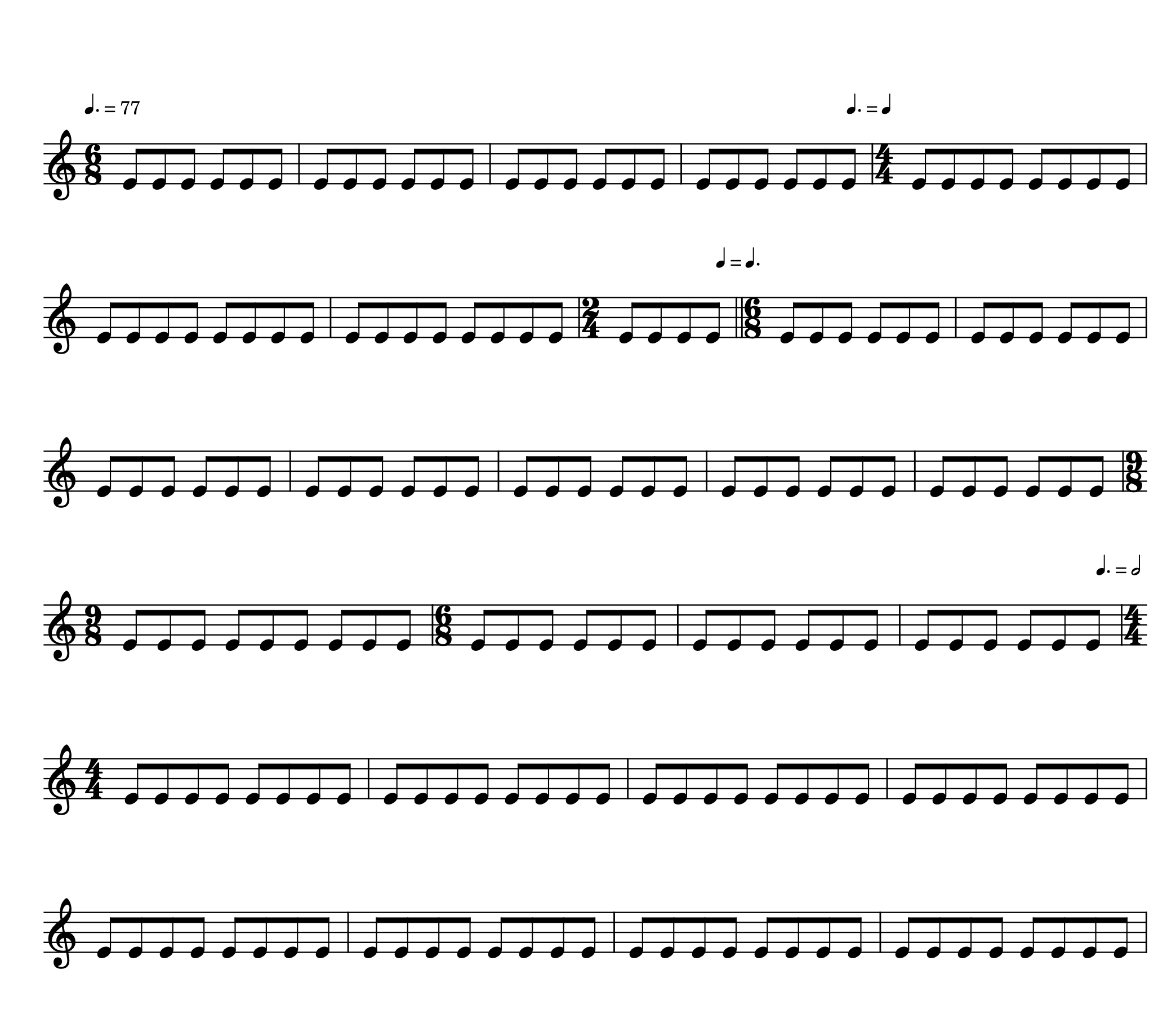
Again, my initial timeline was more than a little optimistic – “Vantage”, the orchestral piece, took on a life of its own. It grew from the Radiohead‑meets‑Soundgarden rock song into a large symphonic piece with a notated score and full orchestral instrumentation. It had so many challenges: compositionally (many metric modulations & meter changes), technically (maxed out rendering memory in Luna), and emotionally (it seemed to never end). It was a massive undertaking.
I created numerous spreadsheets to handle project planning, tracking, and observations along the way – things to remember next time. They were invaluable in helping me to get my thoughts clarified and progress tracked. Here are some screenshots of a few of them.
Songwriting status spreadsheet
Pre-Production tracker
Chigiana-styled composition planning spreadsheet for the orchestral piece, Vantage
Production tracker for all songs
Mixing and mastering prep tracker
Below is the monthly summary of how the whole thing unfolded – the good, the bad, and the metric modulation.
2025
May – Planning & Listening Parties I spent the first week just listening and imagining. A cappella, Texas guitar, gospel, looped/texture guitar, funk, acoustic guitar, NIN‑style synth, Radiohead‑meets‑Soundgarden, orchestral – I wanted nine distinct genres that would somehow feel like one album. The working title was Harvest. I felt inspired.
June – Songwriting Drill Downs Structured writing sessions, daily acoustic rehearsals, and “Cafe Show & Tell” (CST) performances for my wife. The Open D piece (I-40) started to feel real.
July – A Slow Month I dove into the ThinkSpace BBCSO course as well as an InsideTheScore composing challenge. Little direct album progress, but my skills improved.
August – Intensive Writing & Research Deep dives into Todd Rundgren, Aretha Franklin, Robert Fripp, Ry Cooder, Jedd Hughes, Lyle Lovett, Joe Dart & Vulfpeck, Robert Fripp, Nine Inch Nails, Radio Head, Sound Garden, Peter Gabriel & New Blood Orchestra, as well as the composers Holst, Ligeti and Penderecki. Daily work on all songs in rotation. By the end of the month, I had most song structures as well as full lyrics for the Gospel and NIN pieces. “Yes!!”
September – Daily Rehearsals & Charts Wrapped up writing of structures and lyrics. Rehearsed all songs six or seven days a week. Started doing deep‑focus rehearsals: Angel section by section for 50 minutes, Fields and Gospel for 30 each, etc.. Lead sheets in Dorico underway.
October – Charts, CST & Logic Templates Finished charts for Angel, Gospel, and RadioGarden. Restrung all guitars. Created Logic template files for every song – tempo, meters, markers, chord track. Continued performing at CSTs.
November – Production Begins Recorded scratch tracks, primary guitar parts, and vocals. Re‑amped Fields through my pedalboard – “sounds amazing!” Also added more Spitfire libraries, UAD plugins, and Superior Drummer SDX to my system.
December – Vantage Takes Over Everything came to a halt due to metric modulation and orchestration issues for Vantage. Eventually figured it out, after losing a lot of momentum. Then completed notation of Vantage – 2nd verse, chorus, strings, bridge, outro, transition. “Made significant progress – feeling good about the piece again.”
2026
January – Orchestral Scoring & Logic Transition Exported Dorico MIDI to Logic. Assigned articulations for every instrument. Fixed tempo errors where “.500” had gone missing. Discovered that Horns 1‑4 share samples (legato nightmare). Used Tim Davies’ approaches for string and woodwind arrangements – spread out arpeggios became a lifesaver.
February – Articulation Hell → Breakthrough Created SHORTS and LONGS track stacks. Then the workflow adjustment that saved me: Humanisation → Quantisation (40%) → Copy to SHORTS → Re‑assign articulation → Delay offset. Applied to every instrument. The result? “Can’t express how relieved I feel … sounds so much better.” I rendered virtual instruments to audio and never looked back.
March – Vocals, Melodyne & First Luna Mix Learned Melodyne (YouTube and Groove3). Started mixing in Luna, with “The Gospel” being the first song. Discovered clipping before the second chorus – a poorly edited comp region. But then: hardware Manley Voxbox on lead vocal. Huge difference. My vocal recipe became: clip gain → Melodyne → Voxbox → parallel Distressor → Shadow Hills + Pultec. Blackbox on the master bus – “sounds amazing”.
April – Album‑Wide Mix Prep Mixed Angel, Fields, X9, Us, I‑40, Freedom, and Disintegration in Luna. Built a repeatable template. Added to my plug‑in cheat sheet: AMS doubling, Cooper Delay (default for widening), Oceanway in reverb mode.
May – Vantage Deep Mix, Mastering & Burnout DeepSeek helped me generate tables for tape machines, console emulations, summing, reverbs, and delays. Then I created a Mix Processing Bus – all submasters → processing bus → trim bus. This let me keep my tone while hitting -6dB peak for mastering. Vantage went through multiple iterations. I was exhausted. I made a Plan B (only Adaptive Limiter) and a Plan A (full Ozone processing). Plan A sounded better.
June – Submission & Release June 1st: Submitted the audio files to CDBaby. June 5‑8: I went back and updated Vantage Dorico score with timpani, bass drum, piatti, tubular bells, tam tams. June 9: CDBaby passed inspection – album appeared on Apple Music, Amazon Music, Spotify and other streaming services. June 11: Set up Bandcamp release. Announced album release on my website.
Things I Want to Remember for Next Time
Abstractions for everything! – for albums, songs, lyrics, arrangements, mixes, mastering.
Parallel processing – work on all songs in rotation. Prevents getting stuck.
Keeping a project log was super helpful. Often I lost track of what I did and/or when I did something and having the log helped to put things in perspective.
Whiteboard word dumps – adjectives and emotional arcs before writing lyrics.
Modeling after other songs (e.g. Afraid of Americans) was super useful
Songwriting Status Table before notation, huge help!
Created Chigiana-like spreadsheet to identify everything I might want to do in Vantage. Definitely helped to give clarity.
While notating challenging parts, determine rhythms first then add pitches
Having a piano reduction for Vantage was key, particularly for the arpeggios in the WWs.
Having the Chord Track in Logic was super helpful, even just for reference while playing parts in live.
Rehearsals: 1) Extended focus (repeat one section at a time until locked) 2) Going over all songs for a couple of months was huge
Remembering Confidence on opening line is everything
Performing @ CST (Cafe Show & Tell) – weekly creative sharing. Uncovered every blind spot.
Re-Amping with two amps rules (Tone Master + Landau = Amazing)
Stereo pair mic’ing for room tones worked beautifully (watch for positioning and phase coherence)
Tim Davies approaches – string & woodwind arrangements, spread out arpeggios.
Shorts/Longs + delay offset – essential for realistic sample orchestras.
Remember to keep original MIDI tracks with Virtual Instruments removed after bouncing to audio. Hide, but keep them around.
Clip gain to -18dB RMS on all audio tracks.
Melodyne – superior to FlexPitch. Sibilant tool is a lifesaver.
Hardware Voxbox – massively better than software. Use it.
Parallel compression on acoustic guitar is awesome! Loved the Fairchild 770 on Us (Time Constant set to 5, cranked the input gain and the threshold so that -10dB of compression was applied.
Using different Studer A800 machines and tape formulations/setting per instrumentation group made a huge difference to create space EQ wise. See project log for specific settings.
DeepSeek was invaluable in figuring out which tape machines, tape, & settings to use in Vantage (orchestra & rock instrumentation). Also gave really helpful guidance in delays and reverbs to use on all instruments other than the vocals (see project log for specific settings). Really great.
Blackbox HG-2: “Mix bus 1” preset is pretty excellent on just about anything
Other plug-in mentions: AMS vocal doubling, Cooper Delay (default) for widening and giving presence particularly synth bass, and Oceanway in reverb mode on a send
Mix Processing Bus – submasters → processing bus → trim bus to -6dB. Decouples tone from delivery level.
Plan A / Plan B – always have a safety net. Saved me multiple times.
96kHz workflow – record/mix at 96kHz, then convert: 24/96 → 24/44.1 → 16/44.1 with POW‑r #2 dithering.
The making/creating is the prize/goal. I’ll never be this intimate with these songs again.
What to Avoid (or Do Better)
Never skip the metronome during rehearsals – even if not recording to click. My timing suffered.
AI isn’t always great at doing musical analysis and often makes mistakes on advanced usage of music and audio apps.
Need a way to circle back to/review original intentions – e.g., The Gospel drifted from its original meaning. A one‑page abstraction for the lyrics might have caught it.
Create a tempo track before layered recording – I‑40 drifted because I had no click.
Need to remember to voice lead better when writing on guitar and transferring to other instruments
Practice in the recording setup – outside noise and unfamiliar mic position ruined takes.
Hit a roadblock w/ orchestrating Vantage. I think I was making it too important.
Don’t let burnout drive decisions – when exhausted, make a Plan B, rest, then do Plan A properly.
Identity is now available on all streaming platforms (such as Spotify), or you can also listen to it on Bandcamp.
I recently took part in the InsideTheScore composing challenge and found it to be a worthwhile experience. The challenge gave me an opportunity to revisit my composition process and reinforce important concepts in orchestral writing.
Day 1: Laying the Foundation
Mission: Develop a clear musical theme and establish the general structure.
The defined parameters (intro, main idea, development, wind-down) provided clarity and direction. Referring to the Songwriting Sourcebook’s chord table helped in creating a solid chord progression that shaped the piece.
I worked out initial ideas using pencil and guitar, capturing sketches with quick recordings on my phone.
Day 2: Orchestrating the Melody
Mission: Assign the main theme to orchestral instruments for greater impact.
Using Dorico to notate and then arranging in Logic, I split the melody across different orchestral sections. It was a useful reminder of how some software routines can become less familiar without regular use.
Day 3: Adding Depth with Harmony and Rhythm
Mission: Build supportive harmonic and rhythmic layers beneath the main theme.
I incorporated rhythm based on my guitar sketch and adapted the score using ensemble patches, which improved workflow. Planning textures and refining data was important in keeping the arrangement clear.
On this day, I also created a table of parts for each section of the piece, centered around melody, chords, rhythms, and bass to help organize and clarify the roles of each element throughout the composition.
Day 4: Developing Counterpoint and Interaction
Mission: Create a middle layer to interact with the melody.
I shifted to a four-stave layout (melody, counter-melody, harmony, bass), focusing on getting the musical parts balanced using piano sounds. Removing problematic MIDI data was necessary to resolve some technical issues.
Day 5: Final Touches and Detailing
Mission: Add percussion and color instruments for a finished, cohesive sound.
After introducing percussion and adjusting mix elements, I exported and shared the completed piece.
Key Takeaways
Having a complete sketch of melody and chords for the entire piece from the outset is crucial. This foundational step streamlines the process, gives structure to the work, and clarifies the direction for orchestration and development.
Defined structure and planning are helpful throughout the process.
Tools like chord tables and ensemble patches can streamline writing.
Creating a table of parts for each section, focusing on melody, chords, rhythms, and bass, aids organization and clarity.
Remove all unnecessary CC data from imported Dorico MIDI files (particularly CC #7 as it wreaked havoc on Spitfire BBCSO master volumes during Day 4).
Here’s the audio of the final version of the piece:
Here are the charts I put together for this project:
At the start of 2025, I decided to revisit a set of songs I originally wrote in March 2016. Back then, the writing process was unexpectedly fast and cohesive—about nine songs came together in a single week, including melodies, chord progressions, lyrics, and charts. This was a stark contrast to my earlier experiences, where writing music felt difficult and slow, often yielding only a few scattered ideas over the course of a year.
The turning point came from a simple question my wife asked: “Why can’t you make an album in a week?” At first I looked at her with an expression of “you don’t know what you are asking…” but stopped and really considered “why can’t I”? I decided to act as if writing music was easy. That mindset shift resulted in a burst of creativity, and it’s a technique I’ve continued to use on subsequent projects, including Music Sketches, Realworld Beatcamp, Equinox, my Berklee degree, the Chigiana Film Scoring Intensive, and more.
Songwriting Process
I made early handwritten charts and lyric sheets for each song, which proved essential—without them, these songs likely wouldn’t have been recorded. While I didn’t document the process step-by-step, I know that once ideas started flowing, they came quickly. My daily studies of scales, chord scales, and resources like the Songwriting Sourcebook often sparked chord progressions and melodies. For lyrics, I relied on timed free-writing sessions followed by focused work on the song’s theme.
At the end of 2024, my wife and I committed to making 2025 a year of personal projects, which prompted me to finally bring these songs to life.
Arranging and Notation
For lead sheets, I used Dorico (which I absolutely love to work with). Its logical workflow made the process efficient and clear, particularly when working with lyrics. When I encountered challenging syncopated rhythms, I turned to targeted ear training with Ear Master, which has improved my overall musicianship.
Early on, I practiced songs in a freeform way and only used proper recording setups on the day of tracking, which was stressful and rarely yielded satisfactory results. I changed my approach to rehearse with a microphone, audio processing, and a click or drum track from the start of each week. Recording rehearsals and focusing on looping tricky sections helped clarify arrangements and improved the feel of each song.
Recording Workflow
Before recording, I made sure to define the essentials for each song: key, meter, tempo, and rhythms. I found an effective microphone position for recording guitar and vocals simultaneously—placing a condenser mic at shoulder height, with the back pointed toward the right corner of the room.
I used templates in both Luna and Logic, which sped up the technical side of recording. This was my first project entirely at a 96kHz sample rate, which struck a good balance between clarity and manageable file sizes. I also used Logic’s chord track feature and recorded the click to an audio track, automating its volume to minimize headphone bleed during softer passages.
While I enjoyed recording in Luna, I returned to Logic for its strength in working with MIDI in case I ever wanted to add any additional instruments. The songs are ready for further development if I choose to revisit them.
Mixing and Mastering
All songs were mixed in a single Luna session using consistent signal routing and templates. I relied on plug-ins like UA Voxbox for de-essing and Brainworx SSL 9000J for clarity on both vocals and guitar. Parallel compression, distortion, and reverb (using Capitol Chambers) added depth, while UA’s Studio D provided stereo width. The mix bus chain included SSL G Bus Compressor, Fairchild 670, ATR-102, and an 1176 used as a limiter.
Final mastering was done in Logic, with level matching and Ozone for polish.
Cafe Show & Tell (CST)
My wife and I created a weekly “Cafe Show & Tell” to share the progress we were making on our respective projects. These regular deadlines provided accountability and helped us stay on track. For my project, in addition to rehearsing and recording a new song, I performed two songs each week—one that was recorded and one for the following week.
Performing for someone else, even a close partner, felt very different from solo practice and highlighted the importance of preparation. Small details, like avoiding shirts with sleeve buttons (which can create unwanted noise), became apparent. Warming up 30 minutes before performing, closing my mouth when not singing, and pushing through mistakes were all practical lessons learned.
We also had weekly review meetings every Sunday night to help us reflect on progress and plan next steps, that made a significant difference in maintaining momentum.
This project has reinforced the value of mindset, preparation, and incremental progress in creative work. Revisiting these songs has been both a technical and personal journey, and the process itself has become as meaningful as the finished recordings.
The album is now available on all streaming platforms (such as Spotify), but you can also listen to it here on Bandcamp.
This past spring, I dove into the Spitfire Audio Colossus Re-Scoring Competition with an approach that started simple: a piano reduction in Dorico, then a MIDI export to Logic Pro, where I fleshed out the arrangement using Spitfire’s Contemporary Drama Toolkit, Abbey Road One, Ólafur Arnalds Cells, and Omnisphere 2. For a full breakdown of that process, see my post here.
After the competition, I decided to take things further by creating a full orchestral score in Dorico and building a new Logic Pro template based on Spitfire’s BBC SO and Abbey Road Orchestra. My goal was not only to improve the sound, but also to test a workflow I could use for future orchestral projects.
The Good: Dorico’s Notation Power
Writing the expanded score in Dorico was a pleasure—everything felt intuitive and efficient, especially compared to Finale. But when it came time to export MIDI for Logic, I hit a few snags.
The Not-So-Good: MIDI Export Challenges
Depending on the expression map you are using, Dorico exports a lot of extra MIDI data, and there’s no way to turn it off. The expression and modulation information didn’t translate well to Logic, so I ended up deleting everything but the notes and velocities and redoing all the expressive details by hand. The BBC SO expression maps from Dorico’s website didn’t help much either.
I get that Dorico can’t know how I want velocities mapped to my sample libraries, but it still made the process more tedious than I’d hoped.
Mixing & Template Insights
Spitfire’s plugins have multiple volume controls, which can get confusing. I found that using Logic’s mixer for overall volume, and plugin controls for expression/modulation, made things much easier. Other key takeaways:
Logic’s velocity values didn’t always match Dorico’s (fff = 100 instead of 120–127).
Short articulations need careful velocity/expression; long ones depend on modulation.
Map divided parts (like Flute 1 & 2) across solo instrument/leader and section instruments.
Quantizing and humanizing MIDI in Logic helped restore a natural performance.
Mixing Approach
For this version, I used the AMEK 9099 on group buses (details here), and my usual mix bus chain: SSL G Bus Compressor, Fairchild 670, and ATR-102.
Downloads & Links
My updated 2025 Orchestral Template for Logic Pro:
Upgrading my competition entry was a valuable learning experience. Dorico is a fantastic notation tool, but exporting to Logic for detailed mockups still takes some manual work. The payoff: a more expressive, nuanced orchestral sound—plus a workflow I’ll use again.
As a composer, I recently had the exciting opportunity to participate in the Spitfire Audio Colossus Re-Scoring Competition. This challenge allowed me to flex my creative muscles and dive deep into the world of dystopian soundscapes. In this blog post, I’ll take you through my process of creating an original musical score that evokes tension, unease, and drama.
Conceptualization
My goal was to create a score that would complement dystopian imagery, building a journey from quiet suspense to dramatic intensity. I wanted to capture the essence of a blockbuster production while maintaining a unique and engaging sound.
Tools of the Trade
To bring my vision to life, I carefully selected a variety of high-quality sound libraries and software:
Spitfire Audio’s Contemporary Drama Toolkit
Abbey Road One (various orchestral sections)
Olafur Arnalds Cells
Spectrasonics’ Omnisphere 2
These libraries provided a rich palette of sounds, from orchestral elements to modern synth textures.
Production Process
My workflow centered around Logic Pro as my primary Digital Audio Workstation, with notation work done in Steinberg’s Dorico. This combination allowed for both detailed audio production and professional notation capabilities.
To enhance the audio and achieve a polished, professional sound, I employed several signal processing tools:
Universal Audio’s SSL G Bus Compressor
Fairchild 670 Compressor
Ampex ATR-102 Master Tape
Logic’s built-in Limiter, Distortion, and EQ
Izotope’s Ozone 9 for final mastering
Reflections
This project was a great experience as it challenged me to blend diverse elements seamlessly and push the boundaries of my creativity. The process of crafting a score that can stand alongside blockbuster productions was both daunting and exhilarating.
I’ll be doing a more behind-the-scenes look at my composing process in another post, where I’ll focus on what worked, what could have gone better, and what I want to remember moving forward.
Thanks to Spitfire Audio for providing the opportunity to be part of this.
Towards the end of last year I decided to try out a demo version of Steinberg’s Dorico Notation Software, as I had heard great things about it from some of my friends at Chigiana. I loved it so much that I bought a full version once the demo expired. How I wish that I had been able to use it while I was in Berklee’s program. It’s so much more enjoyable to work with than Finale, on so many levels.
While I found some great tutorials on YouTube and Groove3, it wasn’t the same as doing a real project, from start to finish. For this I chose to create a project that would combine a few things I had been wanting to do for a while.
First, notate a full orchestral score in Dorico, while using Note Performer (which I hadn’t really used yet). Secondly, analyze and recreate some of the scores in composer Ryan Lynch’s “10 ESSENTIAL Orchestral Scores You Need To Study” list. For this project I chose to focus on Mozart’s Symphony No 40 in G minor.
Based on the original score found on IMSLP, here is the version that I created (first five minutes of the piece):
Overall, I really enjoyed this project as it helped me to get more familiar with Dorico while giving me an even deeper appreciation of just how great Mozart’s music is. Just amazing!
One of the highlights of the Fall 2022 Term was a collaboration that I did with fellow Berklee Online students Adriene Mixon and Parker Sanders as part of the Project Management For Musicians course we were in.
The song features Adriene’s beautiful lyrics, Parker’s well-crafted guitar solo, and me handling the rest. I really like how this one turned out.
Thank you, Adriene and Parker, for working on this with me!